What the measurements say
| No cache plugin | WP Rocket default | WP Rocket recommended | Super Cache + local fonts | Super Cache + Autoptimize + local fonts | |
|---|---|---|---|---|---|
| Server response | 651 ms | 430 ms | 412 ms | 293 ms | 275 ms |
| LCP mobile | 4.36 s | 4.59 s | 3.91 s | 3.93 s | 3.79 s |
| LCP desktop | 1.33 s | 1.25 s | 0.85 s | 0.91 s | 0.88 s |
| First paint mobile (FCP) | 2.02 s | 1.88 s | 1.32 s | 1.39 s | 1.62 s |
| Lighthouse mobile | 83 | 82 | 88 | 87 | 88 |
| Lighthouse desktop | 94 | 97 | 99 | 99 | 99 |
| Page size mobile | 708 KB | 736 KB | 730 KB | 829 KB | 750 KB |
| Requests mobile | 67 | 66 | 35 | 64 | 44 |
| Third-party requests | 8 | 7 | 0 | 0 | 0 |
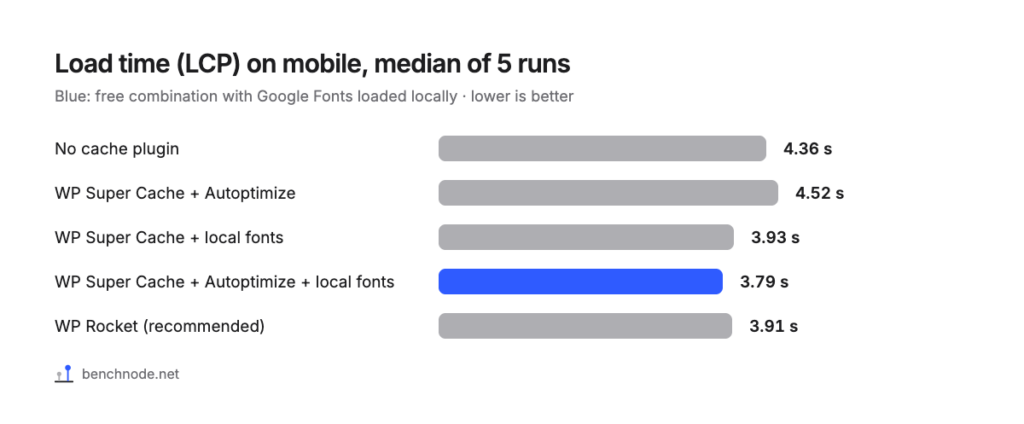
Two things stand out. First, activating it isn’t enough. The gain only comes with the recommended settings. Second, the biggest lever on our test page was loading Google Fonts locally, which you can also set in Elementor without WP Rocket. The steps are in a free alternative to WP Rocket.
The differences between WP Rocket and the free setups with local fonts are smaller than the variation between individual runs. This was measured on one test page and one server, so your site may behave differently.
What you get for the money
- Everything in one plugin: page cache, CSS and JavaScript, lazy load and fonts all live in one place. The free route takes two plugins and an Elementor setting.
- Removing unused CSS: mobile requests dropped to 35 for us. The free combination needed 44.
- Cache preloading: the first visitor after a cache clear got a response in 392 instead of 884 milliseconds. Details are in the preload article.
- Vendor support: with the free plugins, you rely on public forums. We didn’t test WP Rocket’s support.
What WP Rocket costs
| License | Websites | Regular per month | Promo price per month |
|---|---|---|---|
| Single | 1 | €4.16 | €2.50 |
| Plus | 3 | €8.33 | €5.00 |
| Multi | 50 | €20.83 | €12.50 |
As of 8 November 2026, according to wp-rocket.me/pricing. Billing is yearly, the promo price applies to the first year according to the vendor, and taxes may apply depending on your country. You can try WP Rocket for 14 days. Check the prices before you buy, since they change.
Who it’s worth it for
- You don’t want to dig into this: set it up once and maintain one plugin.
- You manage sites for clients: the same settings can be exported and imported.
- Your time costs more than the license: at €2.50 to €4.16 a month, it pays for itself quickly.
Who it’s probably not for
- You’re on a tight budget and have some patience: the free setup got just as far in our test.
- Your host uses LiteSpeed: take a closer look at LiteSpeed Cache. We couldn’t check that on our Apache server.
- You expect a one-click miracle: out of the box, our mobile LCP didn’t change.
You’ll find the full comparison in caching plugins for Elementor compared.
For the technically curious: test setup and raw data
- Lab: WordPress 7.1.4, PHP 8.4, Hello Elementor 3.5.2, Elementor 4.3.6, Elementor Pro 4.3.2, shared hosting at All-Inkl with Apache. Methodology
- Plugins: WP Rocket 3.24, WP Super Cache 3.1.5, Autoptimize 3.1.17.
- Measurement: Server time with curl, 15 requests. Lighthouse 5 runs each on mobile and desktop, median. In every setup, a function test and a check that the page came from the cache.
- Raw data: caching-plugins-elementor-rohdaten.csv. Measured on 8 November 2026.