The results
| No cache plugin | Super Cache + Autoptimize | Super Cache + local fonts | Super Cache + Autoptimize + local fonts | WP Rocket recommended | |
|---|---|---|---|---|---|
| Server response | 651 ms | 333 ms | 293 ms | 275 ms | 412 ms |
| LCP mobile | 4.36 s | 4.52 s | 3.93 s | 3.79 s | 3.91 s |
| LCP desktop | 1.33 s | 1.11 s | 0.91 s | 0.88 s | 0.85 s |
| First paint mobile (FCP) | 2.02 s | 2.05 s | 1.39 s | 1.62 s | 1.32 s |
| Lighthouse mobile | 83 | 82 | 87 | 88 | 88 |
| Lighthouse desktop | 94 | 98 | 99 | 99 | 99 |
| Page size mobile | 708 KB | 628 KB | 829 KB | 750 KB | 730 KB |
| Requests mobile | 67 | 49 | 64 | 44 | 35 |
| Third-party requests | 8 | 8 | 0 | 0 | 0 |
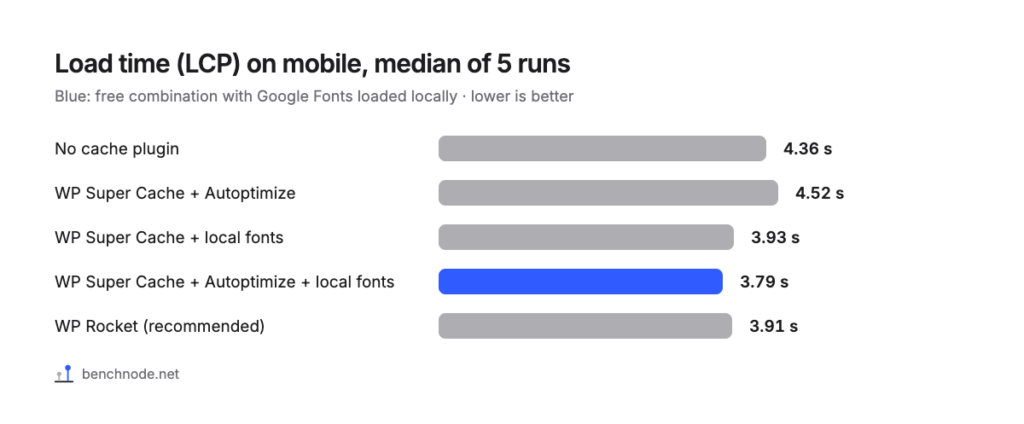
The differences between the three setups with local fonts are smaller than the variation between individual runs. With Autoptimize and local fonts, the 5 runs ranged from 3.50 to 4.82 seconds. With WP Rocket they ranged from 3.85 to 4.34 seconds. So there’s no winner here.
Worth noting: WP Super Cache plus local fonts alone reached 3.93 seconds, with no Autoptimize at all. If you want to keep things simple, you can skip the second plugin.
How to set up the free stack
1. Load Google Fonts locally
- In the WordPress menu, click Elementor.
- On the left, under Editor, open Settings.
- On the Performance tab, set Load Google Fonts Locally to Enable.
- Save, then visit your home page once.
Background and measurements are in how to host Google Fonts locally.
2. WP Super Cache
- Install and activate the WP Super Cache plugin.
- Open Settings → WP Super Cache.
- On the Easy tab, select Caching On and click Update Status.
- On the Advanced tab, tick Enable Caching.
- Under Cache Delivery Method, select Expert and click Update Status.
- Further down, click Update Mod_Rewrite Rules.
3. Autoptimize (optional)
- Install and activate the Autoptimize plugin.
- Open Settings → Autoptimize, tab JS, CSS & HTML.
- Tick Optimize JavaScript Code?.
- Instead of Aggregate JS-files?, choose Do not aggregate but defer?.
- Tick Optimize CSS Code? and Aggregate CSS-files?.
- Click Save Changes and Empty Cache.
- On the Images tab, tick Lazy-load images? and save.
Then check your menu, sliders, forms and popups. Everything worked for us. Combining JavaScript did hurt in our test, though: mobile LCP rose to 5.24 seconds.
What you give up compared with WP Rocket
- Everything in one place: you’re looking after two plugins and an Elementor setting.
- Removing unused CSS: neither plugin did that in our setup. WP Rocket needed 35 requests on mobile, the free combination 44.
- Cache preloading: we didn’t test this for the free stack.
- Support: with the free plugins, you rely on the public forums.
Server response time, on the other hand, favors the free stack: 275 milliseconds instead of 412.
You’ll find the full comparison in caching plugins for Elementor compared. If you go with WP Rocket: how to set up WP Rocket for Elementor.
For the technically curious: test setup and raw data
- Lab: WordPress 7.1.4, PHP 8.4, Hello Elementor 3.5.2, Elementor 4.3.6, Elementor Pro 4.3.2, shared hosting at All-Inkl with Apache. Methodology
- Plugins: WP Super Cache 3.1.5, Autoptimize 3.1.17, WP Rocket 3.24.
- Measurement: Server time with curl, 15 requests. Lighthouse 5 runs each on mobile and desktop, median. In every setup, a function test, screenshots of home page, menu and popup, and a check that the page came from the cache.
- Cross-check: We measured Autoptimize without local fonts twice: 4.52 and 4.45 seconds on mobile.
- Limits: One test page, one server, one evening. On a site with different fonts, or no Google Fonts at all, the effect will differ.
- Raw data: caching-plugins-elementor-rohdaten.csv. Measured on 8 November 2026.