The result
The same Elementor page, setting by setting, measured five times on mobile and five times on desktop. The table shows the median. The last column says whether menu, slider and popup still worked, checked on 12 fresh page loads.
| Step | Load time mobile (LCP) | Desktop (LCP) | Score mobile | Page weight | Requests | Works |
|---|---|---|---|---|---|---|
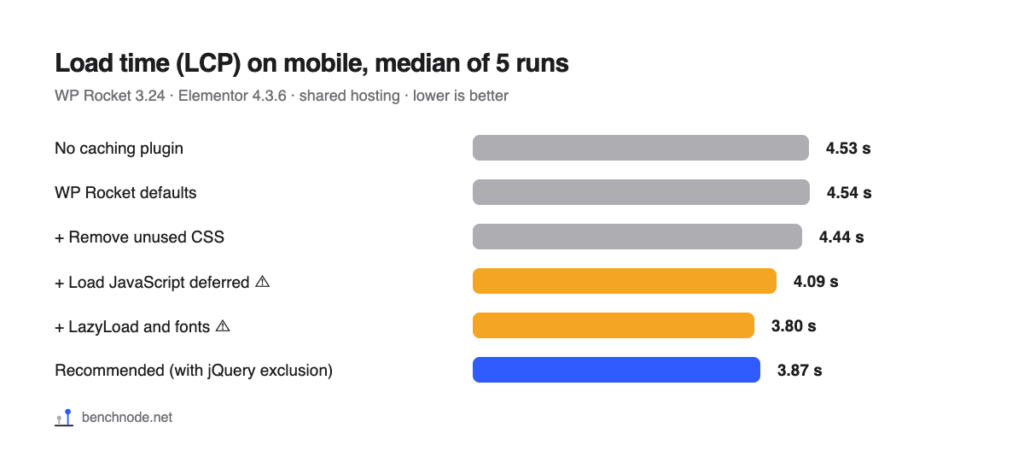
| No caching plugin | 4.53 s | 1.31 s | 82 | 708 KB | 67 | ✓ |
| WP Rocket out of the box | 4.54 s | 1.24 s | 83 | 736 KB | 66 | ✓ |
| + Remove Unused CSS | 4.44 s | 1.19 s | 83 | 713 KB | 46 | ✓ |
| + Load JavaScript deferred | 4.09 s | 1.07 s | 86 | 713 KB | 46 | ✗ menu, slider, popup failed on 7 of 12 loads |
| + LazyLoad, Add missing image dimensions | 3.86 s | 1.11 s | 88 | 611 KB | 45 | ✗ same, only 5 of 12 ok |
| + Preload fonts, Self-host Google Fonts | 3.80 s | 0.79 s | 89 | 730 KB | 35 | ✗ only 6 of 12 ok |
| + Delay JavaScript execution | 3.32 s | 0.82 s | 92 | 459 KB* | 38* | only after first touch |
| + One-click exclusions for Elementor | 3.57 s | 0.82 s | 90 | 734 KB | 34 | ✓, but first tap approx. 0.2 instead of 0.02 s |
| Recommended: everything up to fonts, jQuery excluded | 3.87 s | 0.86 s | 88 | 730 KB | 35 | ✓ 12 of 12 |
* Lighthouse never touches the page, so WP Rocket never loads the scripts during the test. Real visitors still load them on their first tap or scroll. These numbers are not a real gain, and the shorter load time in this row is partly due to the same effect.
How precise are the numbers? The same recommended setup gave 4.02 instead of 3.87 seconds on mobile in a second series on the same day. So differences below about 0.15 seconds are not reliable.
Why the cache alone isn’t enough
Out of the box WP Rocket caches the page, minifies CSS and JavaScript and preloads links. The server’s first response gets almost twice as fast (0.38 instead of 0.67 seconds). On mobile, the page is still no faster (4.54 instead of 4.53 seconds), and on desktop only slightly (1.24 instead of 1.31). The phone is hardly waiting for the server. It’s mostly waiting for CSS and JavaScript files, images and fonts. That’s where the next settings come in, each with a small contribution.
The settings step by step
All settings are under Settings → WP Rocket. After each change, click Save Changes and Optimize at the bottom.
JavaScript & CSS: CSS Files
- Minify CSS files is on by default. Leave it.
- Turn on Optimize CSS delivery and choose Remove Unused CSS. On mobile this does little on our page (4.54 → 4.44 seconds, almost within noise), on desktop 1.24 → 1.19 seconds. But the page needs 20 fewer requests (66 → 46), because WP Rocket replaces the individual CSS files with one embedded, cleaned-up stylesheet.
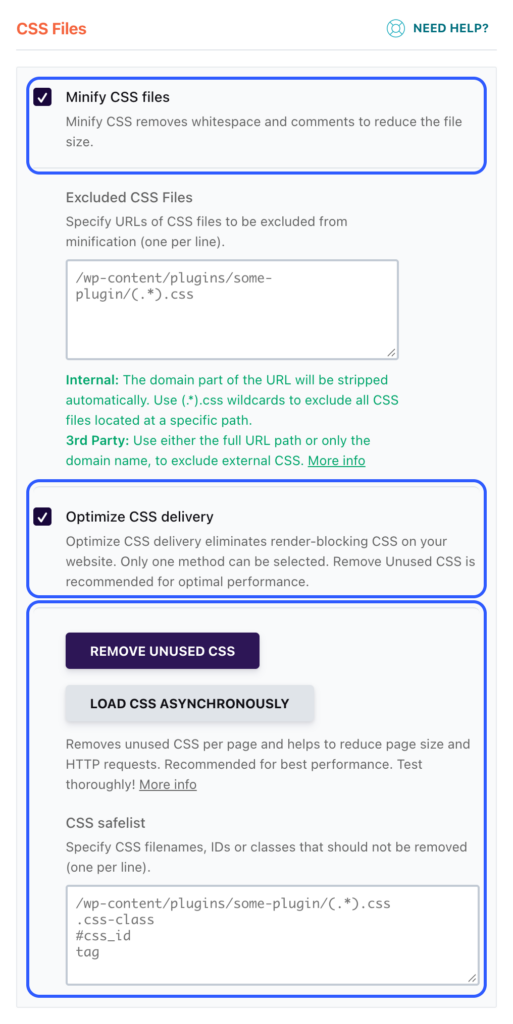
Good to know: WP Rocket doesn’t compute the cleaned-up CSS on your server but on its own servers, which fetch your page and its CSS files to do it. It takes about a minute per page until the result is in. If your site is behind password protection, for example a staging site, you have to let WP Rocket’s servers reach not only the page but also the CSS, JavaScript and font files. Otherwise WP Rocket still reports “completed” and delivers empty CSS. That’s exactly what happened to us (see the correction above).
How to check it:
- Open your page in a private window.
- View the page source and search for
wpr-usedcss.
If that block contains a lot of CSS (about 146 KB for us), everything worked. If it’s empty or the page suddenly looks unstyled, the WP Rocket service can’t reach your files.
JavaScript & CSS: JavaScript Files
- Minify JavaScript files is on by default. Leave it.
- Turn on Load JavaScript deferred. Mobile goes from 4.44 to 4.09 seconds, desktop from 1.19 to 1.07.
- Important: in the Excluded JavaScript Files field right below it, add this line:
/jquery-?[0-9.](.*)(.min|.slim|.slim.min)?.jsWithout this line, menu, slider and popup from Elementor Pro fail on about every second page load. The next section explains why. The exclusion costs hardly any time: 3.87 instead of 3.80 seconds on mobile, which is within noise, and 0.86 instead of 0.79 seconds on desktop. In return, the page works reliably.
We leave Delay JavaScript execution off. More on why below.
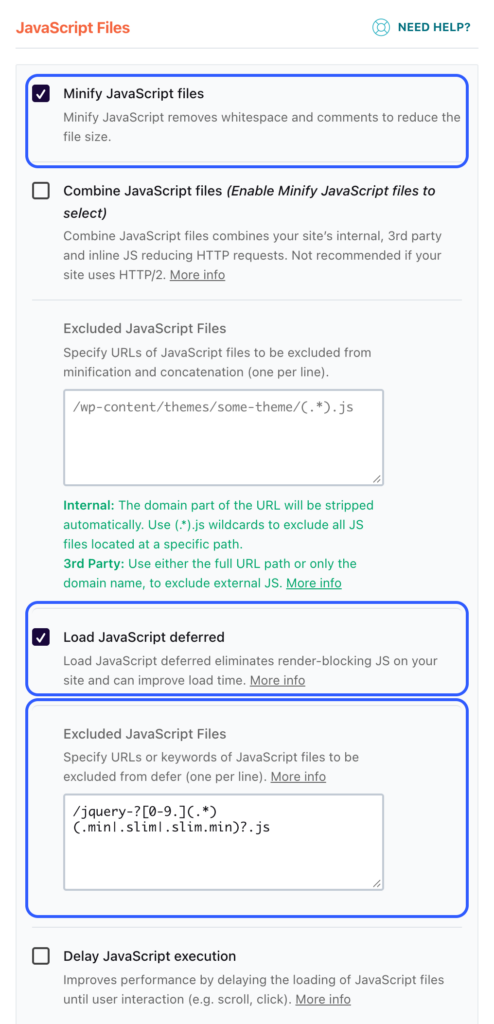
Image & Media
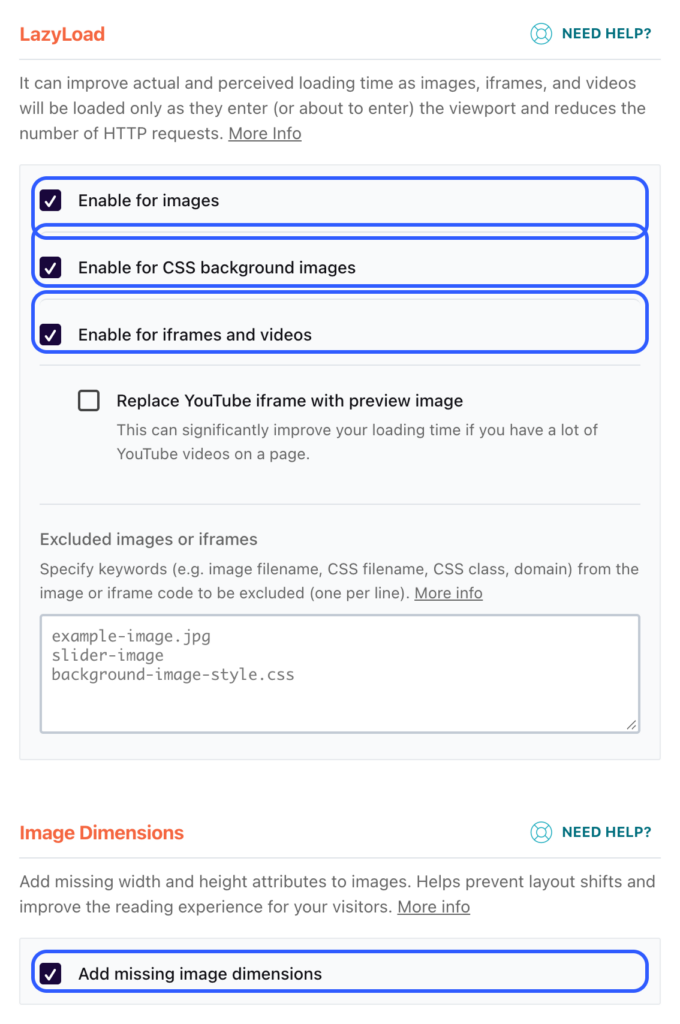
- Under LazyLoad: turn on Enable for images, Enable for CSS background images and Enable for iframes and videos.
- Under Image Dimensions: turn on Add missing image dimensions.
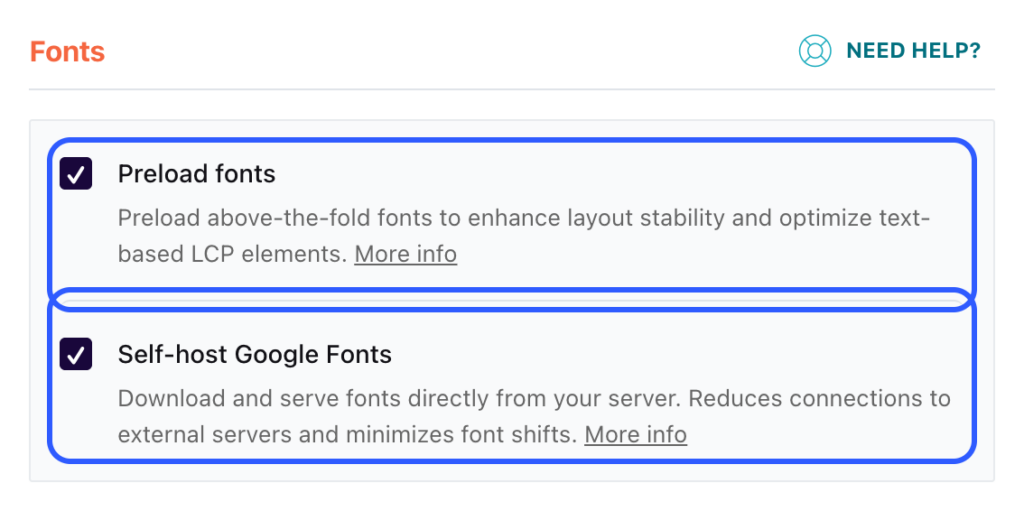
- Under Fonts: turn on Preload fonts and Self-host Google Fonts.
LazyLoad and image dimensions save just over 0.2 seconds on mobile (4.09 → 3.86) and make the page lighter: 713 → 611 KB. The font options barely change mobile (3.80 seconds), but make a clear difference on desktop: 1.11 → 0.79 seconds, plus 10 fewer requests. Page weight goes back up to 730 KB. And with Self-host Google Fonts your visitors’ browsers no longer contact any Google server, which matters for privacy too. More in Host Google Fonts locally.
Preload
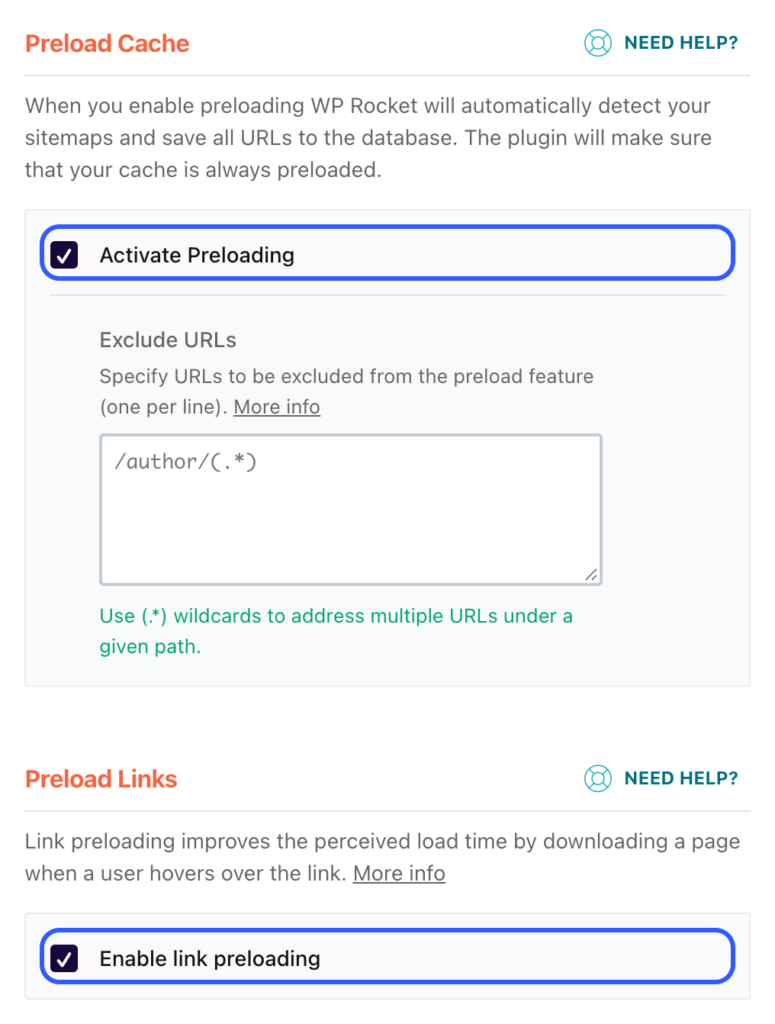
Activate Preloading and Enable link preloading are on by default. Leave them. WP Rocket then builds the cache for all pages by itself instead of waiting for the first visitor.
What can break with Elementor
In our test, menu, slider and popup simply stopped working at some steps. No error message, no warning, the page looked normal. The burger menu just didn’t respond and the slider stood still.
The cause: Load JavaScript deferred also pushes jQuery back. jQuery then reports “ready” while the other scripts are still loading. Elementor starts right away and fires its start signal. If Elementor Pro isn’t there yet at that moment, it misses the signal. Menu, slider and popup come from Elementor Pro, so they are never activated. It’s a race: sometimes Pro wins, sometimes not. We proved it with timestamps: in one failing load, Elementor started after 922 milliseconds, Elementor Pro only finished loading after 927 milliseconds. Five milliseconds decide whether your menu works.
How often menu and slider worked, 12 fresh page loads on mobile each:
| Step | jQuery excluded | Menu and slider work |
|---|---|---|
| No caching plugin | – | 12 of 12 |
| WP Rocket out of the box | – | 12 of 12 |
| + Remove Unused CSS | – | 12 of 12 |
| + Load JavaScript deferred | no | 5 of 12 |
| + LazyLoad, Add missing image dimensions | no | 5 of 12 |
| + Preload fonts, Self-host Google Fonts | no | 6 of 12 |
| same, but without Enable for CSS background images | no | 7 of 12 |
| Recommended (everything up to fonts) | yes | 12 of 12 |
| + Delay JavaScript execution with one-click exclusions | no | 12 of 12 |
As soon as Load JavaScript deferred is on without the jQuery exclusion, about every second load fails. Whether LazyLoad for CSS background images is on hardly matters. In 4 of the 7 failures right after turning it on, Elementor Pro had demonstrably not loaded yet when Elementor started. What makes it so nasty is that it doesn’t always fail: when you test it yourself, everything can look fine. With jQuery excluded it worked on every load for us.
How to check your site:
- Open it several times in a private window on your phone, don’t scroll.
- Tap the menu first.
If it doesn’t open or a slider stands still, the exclusion is missing.
Why we don’t recommend “Delay JavaScript execution”
This option only loads JavaScript once someone touches the page, scrolls or moves the mouse. Lighthouse never does that, so the numbers look good: 3.32 instead of 3.80 seconds and 459 instead of 730 KB. That’s mostly an illusion. Real visitors still load the scripts on their first tap. And without exclusions, Elementor only started after the first touch, so the slider stood still until then.
With the One-click exclusions for Elementor and Elementor Pro everything worked, on all 12 loads. The page then measures 3.57 seconds on mobile, 0.3 seconds faster than our recommendation. But here too, Lighthouse never loads one delayed script. In return, the menu only opened about 0.2 seconds after the first tap instead of 0.02 seconds. You notice that. For an Elementor page like ours, it isn’t worth it. Exact first-tap measurements are in Delay JavaScript execution with Elementor.
What WP Rocket sends and receives
We recorded every step with our Connection Monitor:
- Out of the box: WP Rocket occasionally contacts
api.wp-rocket.mefor pricing and for updates (check_update.php), twice for us right after setup. During the measurement itself there was no outgoing connection. - With “Remove Unused CSS”: one job per page to
saas.wp-rocket.me. It includes the page address, your WP Rocket account email and your license key. The cleaned-up CSS comes back. According to the response, the job runs in an EU queue. Then a WP Rocket server fetches your page itself (for us from46.30.212.202, user agent “WP-Rocket-SaaS”), along with the page’s CSS files. - With “Self-host Google Fonts”: your server downloads the fonts from Google once, for us 6 CSS requests and 25 font files totaling about 1.1 MB. After that, your visitors’ browsers make no requests to outside servers.
WP Rocket doesn’t send any visitor data in the process. For your privacy policy, though, it’s worth knowing that with “Remove Unused CSS” an external service fetches your pages.
Checklist
- JavaScript & CSS: Minify CSS files on, Optimize CSS delivery with Remove Unused CSS
- JavaScript & CSS: Minify JavaScript files and Load JavaScript deferred on, jQuery line in Excluded JavaScript Files
- JavaScript & CSS: Delay JavaScript execution off
- Image & Media: all three LazyLoad options, Add missing image dimensions, Preload fonts, Self-host Google Fonts
- Preload: Activate Preloading and Enable link preloading on (default)
- Then: check in the page source that the
wpr-usedcssblock really contains CSS - Then: open your page several times on mobile in a private window and test menu, slider and popup without scrolling first
Want to optimize Elementor itself first? See Make Elementor faster.
For the technically curious: setup and raw data
- Lab: WordPress 7.1.4, PHP 8.4, Hello Elementor 3.5, Elementor 4.3.6, Elementor Pro 4.3.2, WP Rocket 3.24, shared hosting at All-Inkl. Reference page with hero image, icon boxes, testimonial slider, gallery, accordion, form and popup. Methodology
- Measurement: Lighthouse 13.5.0, 5 runs each on throttled mobile and desktop after one warm-up request. Before each step the lab was reset to the same snapshot and the cache cleared; with “Remove Unused CSS” we waited until WP Rocket reported “completed” and also checked that the delivered cleaned-up CSS was at least 10 KB. It was 146 to 147 KB at every step.
- Measurement noise: the recommended setup gave 4.02 instead of 3.87 seconds on mobile in a second series on the same day. So we don’t treat differences below about 0.15 seconds as real. Server response time (TTFB) on mobile was 674 milliseconds without a caching plugin and 377 with WP Rocket.
- Starting point: WP Rocket with all 79 defaults of a fresh install. Out of the box,
minify_css,minify_js,manual_preload,preload_linksand mobile caching are on. - Functional test at every step with an automated browser on exactly the measured URL: burger menu, slider, accordion, form, popup, console errors. Plus a test with no interaction at all (load, touch nothing, then tap the menu) and, at every step, 12 fresh loads with timestamps for when Elementor and Elementor Pro start. In every failing load, Elementor started before the browser fired
DOMContentLoaded; in every working load, only after it. - The exclusion:
exclude_defer_js=/jquery-?[0-9.](.*)(.min|.slim|.slim.min)?.js. jQuery then runs normally in the page head and only fires “ready” once all deferred scripts have loaded. - Correction of November 8, 2026: our lab is behind password protection. We had only allowed the WP Rocket service to reach the page itself, not its CSS, JavaScript and font files. The service still reported “completed”, but the cleaned-up CSS it delivered was empty. So all numbers from “Remove Unused CSS” onward came from a page without CSS and were far too good. Static files are now allowed only for WP Rocket’s official IP addresses, and our test scripts abort if the cleaned-up CSS is smaller than 10 KB. We re-measured every step and archived the old data. Our earlier observation that the Elementor bug mainly shows up together with LazyLoad for CSS background images did not hold up with real CSS: it appears as soon as “Load JavaScript deferred” is on without the jQuery exclusion.
- Transparency: before that, we had already discarded two measurement series. In the first, the lab snapshot was missing the mobile caching setting and our password protection blocked WP Rocket’s servers. In the second, the functional test loaded the page with an extra parameter that WP Rocket doesn’t optimize, so it checked a different page than the one measured and missed the Elementor bug. All numbers above come from the fourth series, measured on November 8, 2026.
- Raw data: messdaten.csv with all runs. Measured on November 7 and 8, 2026.