Caching in one sentence
Think of a bakery. Without a cache, it only bakes a roll when someone asks for one. With a cache, there are already rolls on the counter in the morning, and the customer gets one right away. Without a cache, WordPress works like the first bakery: on every request it fetches texts, settings and Elementor data from the database, runs the code of every plugin and builds the page from it. A cache keeps the result and hands it out directly next time.
The four kinds of cache in WordPress
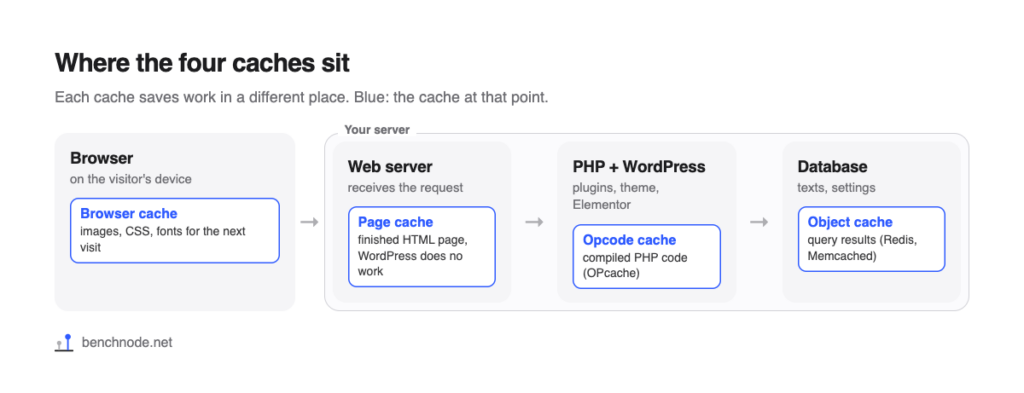
In WordPress, “cache” means four different things. They work in different places and complement each other.
| Kind of cache | What is kept? | Where? | Who benefits? |
|---|---|---|---|
| Page cache | the finished HTML page | on your server, as a file | visitors who are not logged in |
| Browser cache | images, CSS, JavaScript, fonts | in the visitor’s browser | returning visitors and every further page view |
| Object cache | results of database queries | in the server’s memory (Redis, Memcached) | everyone, including logged-in users and the admin |
| Opcode cache | the compiled PHP code | in the server’s memory (OPcache) | everyone, on every request |
Page cache
The page cache does the most. On the first request WordPress builds the page as usual, and the caching plugin saves the finished HTML as a file. Every following visitor gets that file, without WordPress, the database or the plugins having to do any work. That is exactly what plugins like WP Rocket, WP Super Cache or W3 Total Cache are for.
The catch: there is no page cache for logged-in users, the cart, the checkout or the admin, because everyone sees something different there. That is why a page cache does not help against a slow admin.
Browser cache
The browser cache does not save server time, it saves data. Your server tells the browser how long it may keep images, CSS and fonts. On the next visit, the browser does not download them again. Many hosts and caching plugins set this up via the .htaccess file.
Object cache
The object cache keeps results of database queries in memory. WordPress has one built in, but only for the duration of a single request. To keep it from one request to the next, you need a service like Redis or Memcached at your host plus a matching plugin. It helps most where the page cache does not: in the admin, in a shop and for logged-in users.
Opcode cache
Before running its code, PHP compiles it into a kind of machine language. The opcode cache (OPcache) keeps that compiled version. It is already on at almost every host, including ours. Usually you do not have to do anything about it.
What a page cache did on our site
We measured our Elementor test page twice: without a caching plugin and with WP Rocket on its default settings. We measured the time to first byte directly at the server, 20 times each.
| Situation | Without page cache | With page cache |
|---|---|---|
| Visitor (not logged in) | 684 ms | 386 ms |
| Logged-in user | 647 ms | 802 ms |
| First visitor after clearing the cache | – | 813 ms |
| Mobile load time (LCP, Lighthouse) | 4.53 s | 4.79 s |
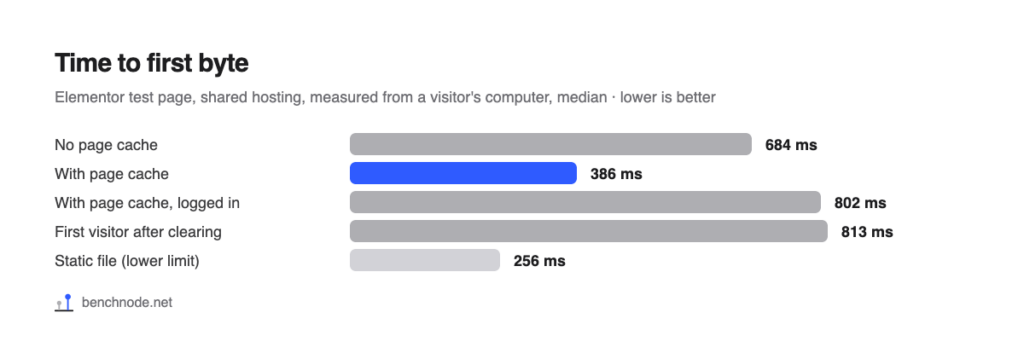
For visitors, the first response came 298 ms sooner with a page cache. No cache can shorten most of the remaining time: a small static file without any PHP took 256 ms for us. That is the trip through the internet and setting up the connection. Logged in, you waited even a little longer with WP Rocket as without it (802 instead of 647 ms), because WordPress builds every page from scratch for logged-in users and the caching plugin runs on top. And the first visitor after clearing the cache waited 813 ms, because WordPress has to build and store the page for them first.
Mobile load time does not depend on the server alone, though. It also waits for CSS, fonts and images. That is why a page cache on its own often does little on mobile. How to solve the other bottlenecks is shown in WP Rocket settings for Elementor.
Browser cache: the second visit
We opened the home page twice in a row in a fresh browser. On the first visit, 62 requests with 864 KB went over the wire. On the second visit there was only 1 request with less than 1 KB; the other 61 files came from the browser cache. That worked just as well without a caching plugin (14 KB), because our host sends the necessary headers on its own. Check this with your host before you turn on a plugin for it.
Why Elementor benefits in particular
Elementor stores every page as a data package and builds the HTML from it on every request. That takes time: on our test page, the server needed about 251 ms without a cache, and with 50 extra plugins more than a second (see How many plugins is too many?). With a page cache, that work disappears for visitors.
How to check whether your page comes from the cache
- Log out or open a private browser window. While logged in, you never get a cached page.
- Open your home page twice. The first request fills the cache.
- Right-click the page and choose View page source.
- Scroll all the way down. If there is a comment from your caching plugin (for WP Rocket, for example, “This website is like a Rocket”), the page came from the cache.
When caching causes problems
- Changes do not show up. Most plugins clear a page’s cache automatically when you save it. After changes to the header, footer, menus or global colors, you often have to clear the whole cache.
- Personal content. Cart, checkout, customer account and pages saying “Hello, name” must not come from the cache. Good plugins exclude WooCommerce pages automatically.
- Forms on old cached pages. Forms often use a security code that expires after a while. If a page stays in the cache for long, submitting can fail. That is why plugins like WP Rocket rebuild the cache regularly.
- Two caching plugins at once. That slows things down rather than helping, and makes problems hard to find. Use exactly one.
Which plugin?
For Elementor sites on shared hosting, we measured WP Rocket in detail, setting by setting: WP Rocket settings for Elementor. A comparison with free plugins is coming soon.
For the technically curious: setup and raw data
- Lab: WordPress 7.1.4, PHP 8.4 with OPcache, Hello Elementor 3.5.2, Elementor 4.3.6, Elementor Pro 4.3.2, shared hosting at All-Inkl. Reference page with hero image, icon boxes, testimonial slider, gallery, accordion, form and popup. Methodology
- States: no caching plugin (“basis” snapshot) and WP Rocket 3.24 with all defaults of a fresh install (page cache, mobile cache, minify CSS and JavaScript, preload links).
- Server: time to first byte with curl, 20 requests as a visitor and 10 as a logged-in administrator, after three warm-up requests. “First visitor after clearing”: the whole WP Rocket cache was cleared before each of the 8 requests.
- Browser cache: mobile Chrome, 5 fresh browsers, two visits to the home page each. We counted requests and bytes that actually went over the network.
- Lighthouse 13.5.0, 5 runs each on mobile (throttled) and desktop.
- Raw data: rohdaten.csv. Measured on November 8, 2026.